Frequently Asked Questions
- About our accounts
- About Our Accounts
- About our accounts
- Email Account How-Tos
- How do I renew a FREE subscription?
- How do I automatically forward my emails to another account?
- How do I see how much of my email quota I am using, and where?
- How do I change my email address or username?
- How do I upgrade my account?
- How do I renew my existing subscription?
- How do I use multiple identities?
- How do I set up email filters?
- Email account user guides
- Email Client Guides
- Getting started
- Glossary
- Most Common Questions
- How do I set up an Out of Office automated response?
- What is the total maximum file size an email attachment can be?
- Phone Support
- Aliases
- How do I set up/manage my aliases?
- How can I archive my emails for safekeeping or transfer?
- Apple Mail App Setup Guide
- Apple Mail Client Guide
- Outlook Setup Guide
- I can't send/receive emails from my mail client/phone.
- How do I Block or mark an email address as safe?
- Tips and information
- Troubleshooting
How do I close my account?
If you wish to fully cancel your account, you can do so by contacting our helpdesk at help@aluminati.net
After the account has been cancelled, you will no longer be able to log in or use it. If you wish to access the service again, you will need to create a new account.
What does 'Manual Verification' mean, and how long do I have to wait?
Manual verification means that there were some details on your application that did not match what the University has on record. Therefore, they need to look up your details manually before they can verify that you qualify for an account, and activate it.
Verification usually takes around 2-3 days, but this can be longer during busy periods or holidays.
If you wish, you can log in to your account to check on the status of your application. Once you have logged in, go to the My Account dashboard and click on Verification in the bottom left:
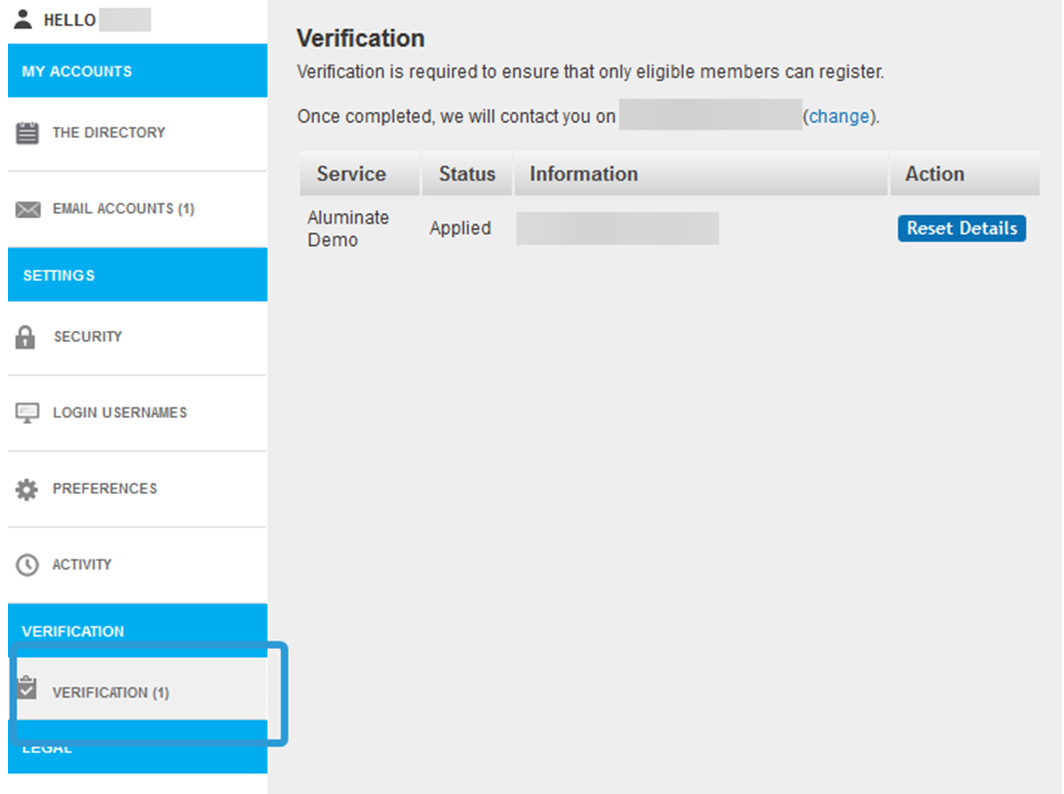
If you have any questions about manual verification, please contact our helpdesk at help@aluminati.net
Activity Logs
Viewing account actions via the Activity Log
You can view a timeline of actions on your account with the related IP addresses.
This includes;
- Successful and unsuccessful login attempts
- Account locks and unlocks
- Password resets
- Alternative email changes
You can view these by;
- Select My Account
- Selecting Activity on the left side of the page. This shows a timeline of actions on your account. (screenshot of this)
These logs are not subject to any automatic deletion or expiry, and logs can be viewed back to when the account was originally created.
